

Today, you and I will quickly take a look at the topic “UNN School Fees Schedule 2026/2027 Academic Session | Freshers & Returning Students“.
This has become necessary as year in year out, new students are being admitted into several federal and state institutions without them first having the knowledge of the financial demands of the institution just like UNN as the case is right now.
Definitely, a lot of things come to mind of aspirants of any university for any academic year and surely, there are a lot of criteria you need to consider before even choosing your dream university.
You may want to consider the location, the academic calendar (How fast it is) and most importantly, the school fees.
However, we will center our focus majorly on school fees for UNN today because your financial strength, as well as that of your parents/guardians, has to be considered before thinking of picking any school.
Currently, UNIBEN is still the only school that has the least school fees. We will consider the school fees schedule for UNN right away.
All courses offered in Nigerian Universities
Therefore, if you are among those that have been searching for [unn school fees for 2026/2027, unn school fees 2026, acceptance and school fees in unn, unn 2026/2027 school fees, unn hostel fees, unn acceptance fee, university of nigeria nsukka postgraduate school fees, unn postgraduate school fees 2026, UNN School Fees Schedule For The 2026/2027 Academic Session], then you can obviously see that you are not alone in this race.
You will get all that you need right here at O3schools without bordering to go anywhere else for free.
UNN School Fees Schedule
Table of Interests
NEWLY Admitted Students:
- Social Sciences – ₦70,700.00
- Pub Admin – ₦70,700.00
- Agriculture – ₦70,700.00
- Education – ₦70,700.00
- Vocational Technical Education – ₦70,700.00
- Arts – ₦70,700.00
- Business Admin – ₦73,200.00
- Environmental Sciences – ₦73,200.00
- Engineering – ₦74,200.00
- Physical Sciences – ₦71,700.00
- Biological Sciences – ₦71,700.00
- Vet Medicine – ₦76,200.00
- Law – ₦76,200.00
- Medicine – ₦77,200.00
- Dentistry – ₦77,200.00
- Health Sc & Tech – ₦77,200.00
- Pharmacy – ₦77,200.00
RETURNING Students:
Social Sciences
- Second Year – ₦45,100.00
- Other years – ₦40,000.00
- Final Year – ₦40,500.00
Social Sciences – pub admin
- Second Year – ₦45,100.00
- Other years – ₦40,000.00
- Final Year – ₦40,500.00
Agriculture
- Second Year – ₦45,100.00
- Other years – ₦40,000.00
- Final Year – ₦40,500.00
Education
- Second Year – ₦45,100.00
- Other years – ₦40,000.00
- Final Year – ₦40,500.00
Vocational Technical Education
- Second Year – ₦45,100.00
- Other years – ₦40,000.00
- Final Year – ₦40,500.00
Arts
- Second Year – ₦45,100.00
- Other years – ₦40,000.00
- Final Year – ₦40,500.00
Business Admin
- Second Year – ₦47,600.00
- Other years – ₦42,500.00
- Final Year – ₦43,000.00
Environmental Sciences
- Second Year – N47,600.00
- Other years – ₦42,000.00
- Final Year – ₦43,000.00
Engineering
- Second Year – ₦48,600.00
- Other years – ₦43,500.00
- Final Year – ₦44,000.00
Biological Sciences
- Second Year – ₦46,100.00
- Other years – ₦41,000.00
- Final Year – ₦41,500.00
Physical Sciences
- Second Year – ₦46,100.00
- Other years – ₦41,000.00
- Final Year – ₦41,500.00
Vet Medicine
- Second Year – ₦49,600.00
- Other years – ₦45,500.00
- Final Year – ₦46,000.00
Law
- Second Year – ₦49,600.00
- Other years – ₦45,500.00
- Final Year – ₦46,000.00
Medicine
- Second Year – ₦49,600.00
- Other years – ₦46,500.00
- Final Year – ₦47,000.00
Pharmacy
- Second Year – ₦51,600.00
- Other years – ₦46,500.00
- Final Year – ₦47,000.00
Dentistry
- Second Year – ₦51,600.00
- Other years – ₦46,500.00
- Final Year – ₦47,000.00
Health Sc & Tech
- Second Year – ₦51,600.00
- Other years – ₦46,500.00
- Final Year – ₦47,000.00
- Dangote’s Top Secrets Of Success
- How to remember anything you have read
- How to study effectively and efficiently
Acceptance fee is a fee that you must pay to any university as a first-year student/fresher denoting that you have accepted the course and in general the admission that has been offered to you by the school.
Therefore without wasting much time, lets head there right away.
The school fees for the first-year students, second-year students, other levels, final year as well as laptop fee and accommodation fee have been dealt with right here on this blog as can be seen below.
You can get the complete break down of the fees which have not still changed for the academic session clicking on any of the links and downloading a PDF copy of the breakdown.
HOW TO PAY SCHOOL FEES ONLINE.
PROCESS FLOW ON HOW TO PAY SCHOOL FEES ONLINE.
1. Type in the address bar on your browser (unnportal.unn.edu.ng) as shown below.
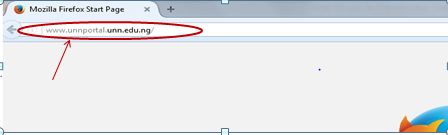
2. Press the enter key on your keyboard, the following screen will appear.
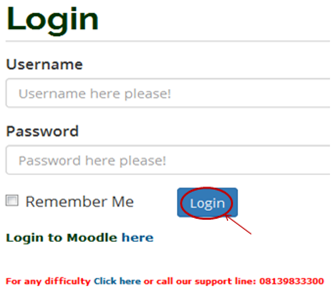
3. Type in your registration number as the username, type in your password, then press the enter key or click on the login button to see the screen below.
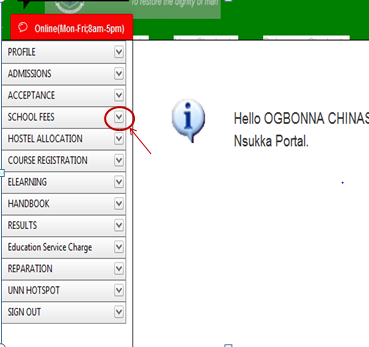 4. From the menu items on the left, click on the drop-down button on “SCHOOL FEES” as shown above, to see the next screen as shown below. Observe the dropdown menu under “SCHOOL FEES”
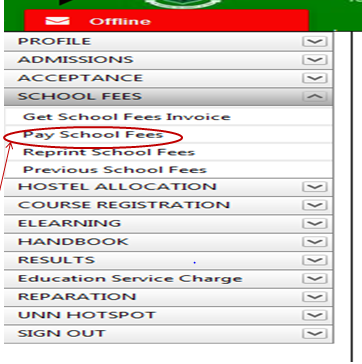 5. Click on “Pay School Fees”. You will notice a dialog box of ” School Fees Payment Procedure”, as shown below. (Read through this procedure carefully).
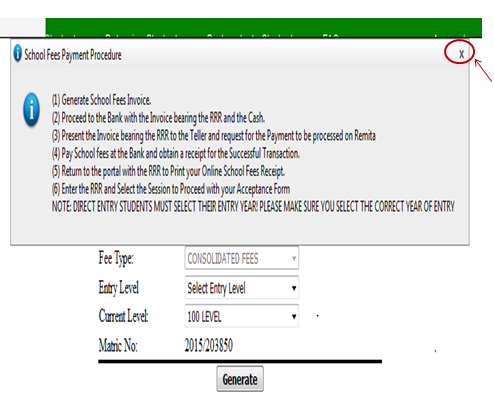
6. After reading the procedure, close the dialog box, by clicking on the “x” mark at the right-hand side of the dialog box to enable you to see the main screen, which appears as shown below.
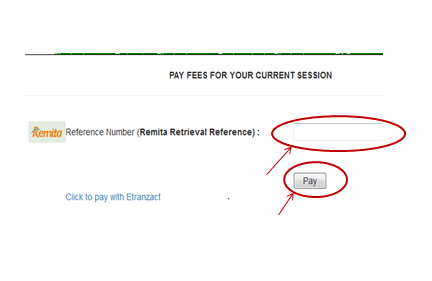 7. Following the ” School Fees Payment Procedure”, enter the RRR number in your bank confirmation slip (which is the same with the RRR number in the invoice you generated) in the “Remita Retrieval Reference” column, as shown above. Click on the “Pay” button and your school fees receipt will appear.
8. Print out the receipt.
HOW TO REPRINT SCHOOL FEES RECEIPT
PROCESS FLOW ON HOW TO REPRINT SCHOOL FEES RECEIPT
- Type in the address bar on your browser unnportal.unn.edu.ng as shown below.
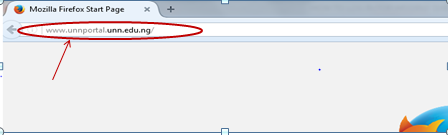
2. Press the enter key on your keyboard, the following screen will appear.
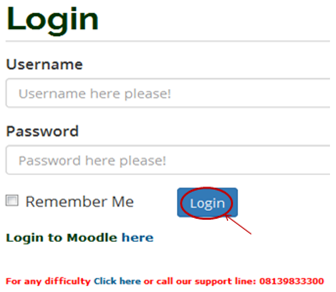
3. Type in your registration number as the username, type in your password, then press the enter key or click on the login button to see the following screen.
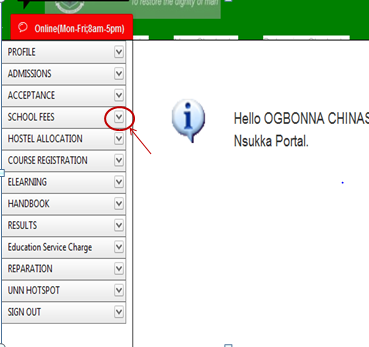
4. From the menu items on the left, click on the drop-down button on “SCHOOL FEES” as shown above, to see the next screen as shown below. Observe the dropdown menu under “SCHOOL FEES”.
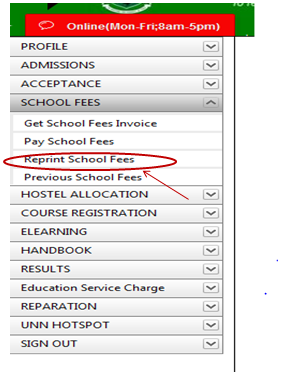 5. Click on “Reprint School Fees” and the screen below will appear.
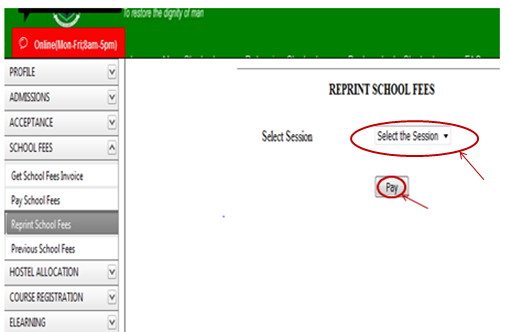
6. Click on the “Select the Section” to select the section of the receipt you want to print, then click on the “Pay” button and your school fees receipt will appear as shown below.
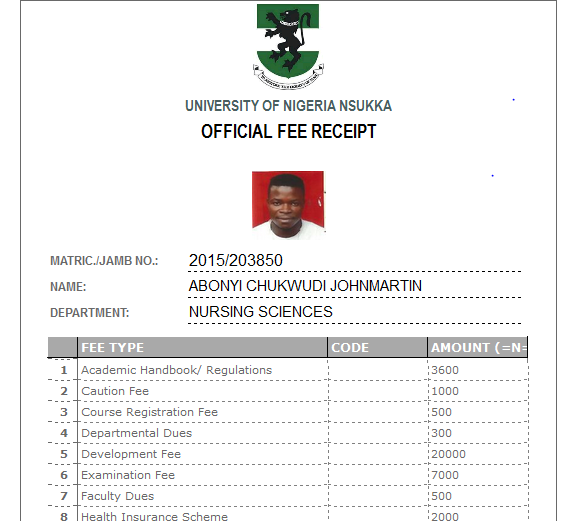
7. Print the receipt out.
HOW TO PAY ACCEPTANCE FEES ONLINE
PROCESS FLOW ON HOW TO PAY ACCEPTANCE FEES ONLINE
1. Type in the address bar on your browser (unnportal.unn.edu.ng) as shown below.
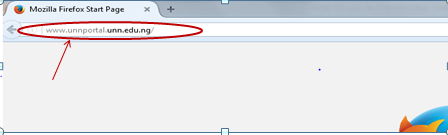
2. Press the enter key on your keyboard, the following screen will appear.
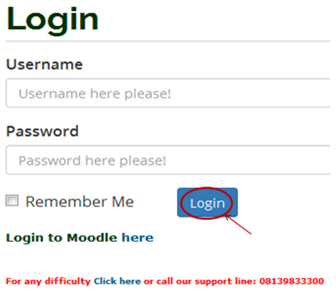
3. Type in your registration number as the username, type in your password, then press the enter key or click on the login button to see the following screen.
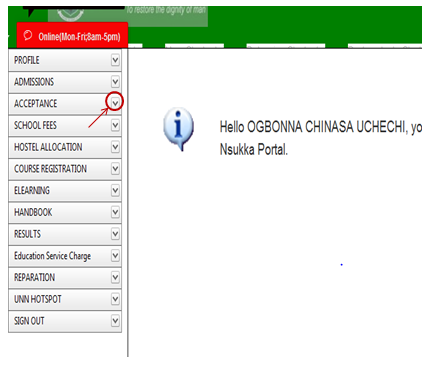 4. From the menu items on the left, click on the drop down button on “ACCEPTANCE” as shown above, to see the next screen as shown below. Observe the dropdown menu under “ACCEPTANCE”.
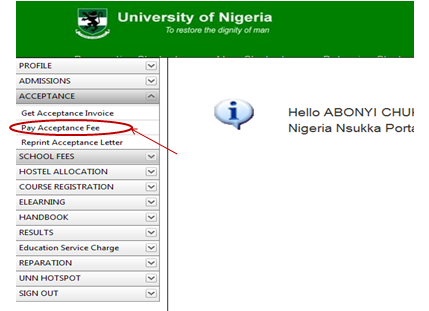
5. Click on “Pay Acceptance Fees”, as shown above, the screen below will appear.
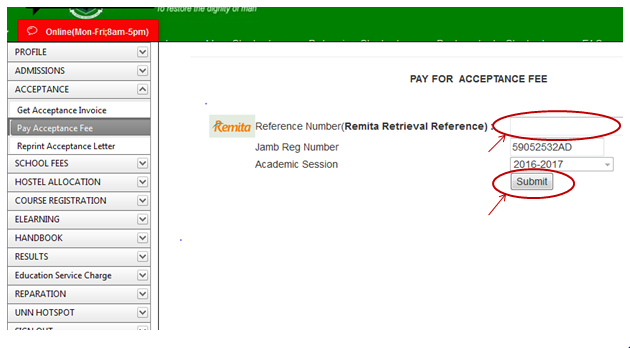
6. Following the” School Fees Payment Procedure”, enter the RRR number in your bank confirmation slip (which is the same with the RRR number in the invoice you generated) in the “Remita Retrieval Reference” column, as shown above. Click on “Submit” button and your Acceptance fees receipt will appear.
7. Print out the receipt.
School fee over-payment info
This is to inform all students who overpaid their school fees that the university administration has instructed a refund of all monies overpaid to the affected students.
All the affected students should please send an email with subject: School fees Overpayment to [email protected] attaching proof of payment.
The date and details for all refunds will be made public soon.
Please check the website regularly for updates
HOW TO MERGE SCHOOL FEES INVOICE
- After payment, go with the copy of the bank confirmation order of the balance payment and bank confirmation/ receipt of the initial incomplete payment made, to ICT Access Bank building.
- Customer care section will (merge the payments) attend to it.
- Go back to the portal, use the RRR number of the initial fees made to print an online receipt.
GENERATE SCHOOL FEES INVOICE
PROCESS FLOW ON HOW TO GENERATE SCHOOL FEES INVOICE
1.Type in the address bar on your browser the portal url (www.unnportal.edu.ng) as shown below.
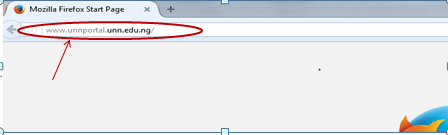
2.Press the enter key on your keyboard, the following screen will appear.
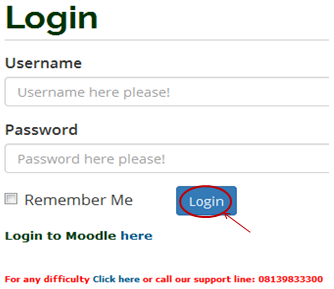
3.Type in your registration number as the username, type in your password, then press the enter key or click on the login button to see the screen below.
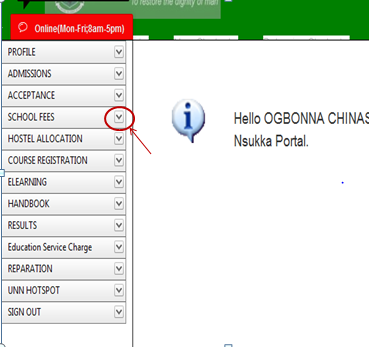
4. .From the menu items on the left, click on the drop down button on “SCHOOL FEES” as shown above, to see the next screen as shown below. Observe the dropdown menu under “SCHOOL FEES”
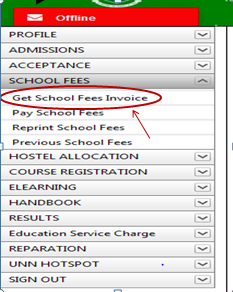
5. Click on “Get School Fees Invoice”. You will notice a dialog box, as shown in the screen below, (Read through this procedure carefully to understand the due process of paying your school fees).
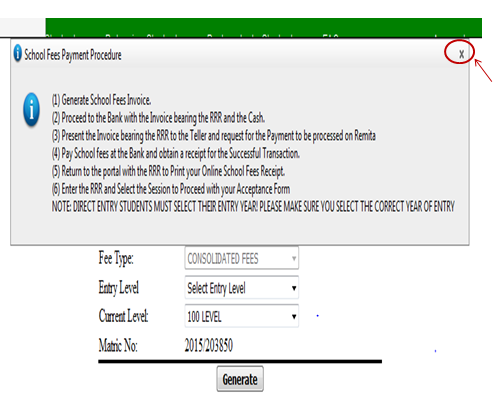
6. After reading the procedure, close the dialog box, by clicking on the “x” mark at the right hand side of the dialog box to enable you see the main screen, which appears as below.
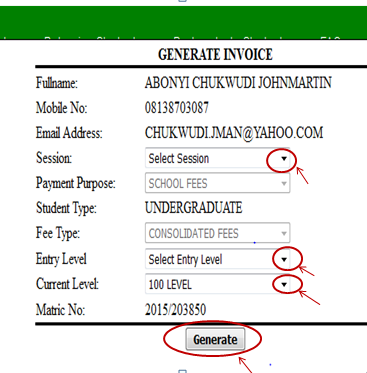
7. Click on the drop down key on “Select Session” to select the session of the invoice you want to generate.
8. Click on the drop down key on “Select Entry Level” to select entry level.
9. Click on the drop down key on “Current Level” to select the level you are in.
10. Click on “Generate” button. The invoice will appear as shown below.
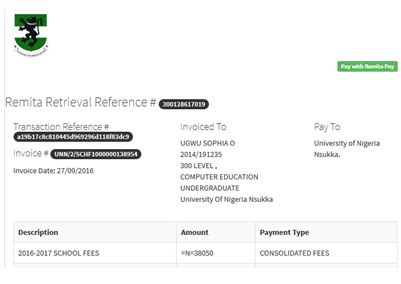
11. Print the Invoice, then follow the “school Fees Payment Procedure”, to pay your school fees in the bank.
12. To proceed to see how to pay school fees online, Click here.
That’s the much I can take on the topic “UNN School Fees Academic Session | Freshers & Returning Fees”
Thanks For Reading
UNN RELATED Articles
UNN Hostel Accommodation Application, Information for New & Returning Students
UNN Academic Calendar Academic Session Is Out
UNN School Fees Schedule For The Academic Session | Freshers & Returning Students
University of Nigeria Nsukka UNN Diploma in Music Education Admission Form
University of Nigeria Nsukka UNN Diploma in Music Education Admission Form
UNN JUPEB Admission List Checker | Check UNN JUPEB Admission List
UNN Admission List | 1st, 2nd, 3rd, 4th, 5th Batch & DE Admission List Out
UNN Post UTME Result | How To Check Your Post UTME Result Easily
FCE Eha-Amufu Degree Post UTME Form Released | Affiliated To UNN
University of Nigeria Nsukka UNN Sandwich Admission List Contact Session | Merit & Supplementary
UNN Inter-University Transfer | Guide and All You Need To Know
UNN JUPEB Supplementary Admission List Released
University of Nigeria Nsukka UNN Direct Entry Screening Form
“UNN Post UTME Form Is Out Online, unn.edu.ng
University of Nigeria Nsukka UNN Change of Degree Application Form
UNN Sandwich Degree & Diploma Admission Forms Contact Session
Please i have paid in the bank with invoice generated but its saying i have not paid for this session. What do i do?
Please just go back to the bank and see if they can do anything about it,you know tell them to print your statement of account and try to reconcile it
What is faculty dues