
Download the Best JAMB & WAEC CBT Apps
Table of Interests
Prepare smarter for JAMB and WAEC with O3Schools CBT Apps. Practice thousands of past questions, study offline, watch video lessons, use AI Tutor, flashcards, and detailed explanations.
JAMB CBT App for PC
Practice JAMB CBT on Windows PC, Laptop and Desktop with thousands of updated questions.
Download Now →JAMB CBT App for Android
Study offline with AI Tutor, flashcards, CBT practice, video lessons and explanations.
Download Now →JAMB CBT App for iPhone
Prepare for UTME on your iPhone or iPad with the complete JAMB CBT App.
Download Now →WAEC CBT App for PC
Prepare for WAEC with past questions, tutorials and CBT simulations.
Download Now →WAEC CBT App for Android
Offline WAEC preparation with videos, AI Tutor and thousands of practice questions.
Download Now →WAEC CBT App for iPhone
Prepare for WAEC anywhere using your iPhone or iPad.
Download Now →Free JAMB Lessons for All Subjects
Study every JAMB subject with simplified tutorials, exam tips, likely questions and detailed explanations.
JAMB Use of English
Comprehension, Lexis, Oral English, Grammar and CBT practice.
JAMB Literature
Poetry, Drama, African Prose and recommended texts.
JAMB Chemistry
Organic Chemistry, Calculations, Practical and theory lessons.
JAMB Physics
Mechanics, Electricity, Modern Physics and solved questions.
JAMB Mathematics
Algebra, Trigonometry, Calculus, Geometry and Statistics.
JAMB Government
Political Institutions, Constitution and Nigerian Government.
JAMB Biology
Ecology, Genetics, Human Physiology and Plant Biology.
JAMB Economics
Demand, Supply, National Income, Money and Inflation.
JAMB CRS
Biblical teachings, miracles, prophets and Christian doctrines.
JAMB Commerce
Business organizations, banking, insurance and trade.
Do you want to register for JAMB?
If yes, the first thing you need is a JAMB profile.
You cannot complete your UTME or Direct Entry registration without one.
The process is simple.
However, many candidates still make mistakes.
Some use the wrong email address.
Others enter incorrect names.
Some even lose access to their accounts because they forget their passwords.
The good news is that you can avoid these problems.
This guide explains everything in simple English.
It is written for both first-time and returning candidates.
By the end of this article, you will know how to create your profile correctly, protect your account, recover your details if necessary, and prepare for the next stage of your admission journey.
Quick Answer
How Do You Create a JAMB Profile?
Creating a JAMB profile is easy.
Follow these steps.
- Confirm that JAMB registration has started.
- Prepare a valid phone number.
- Prepare an active email address.
- Generate your Profile Code using the official JAMB method.
- Visit the official JAMB e-Facility portal.
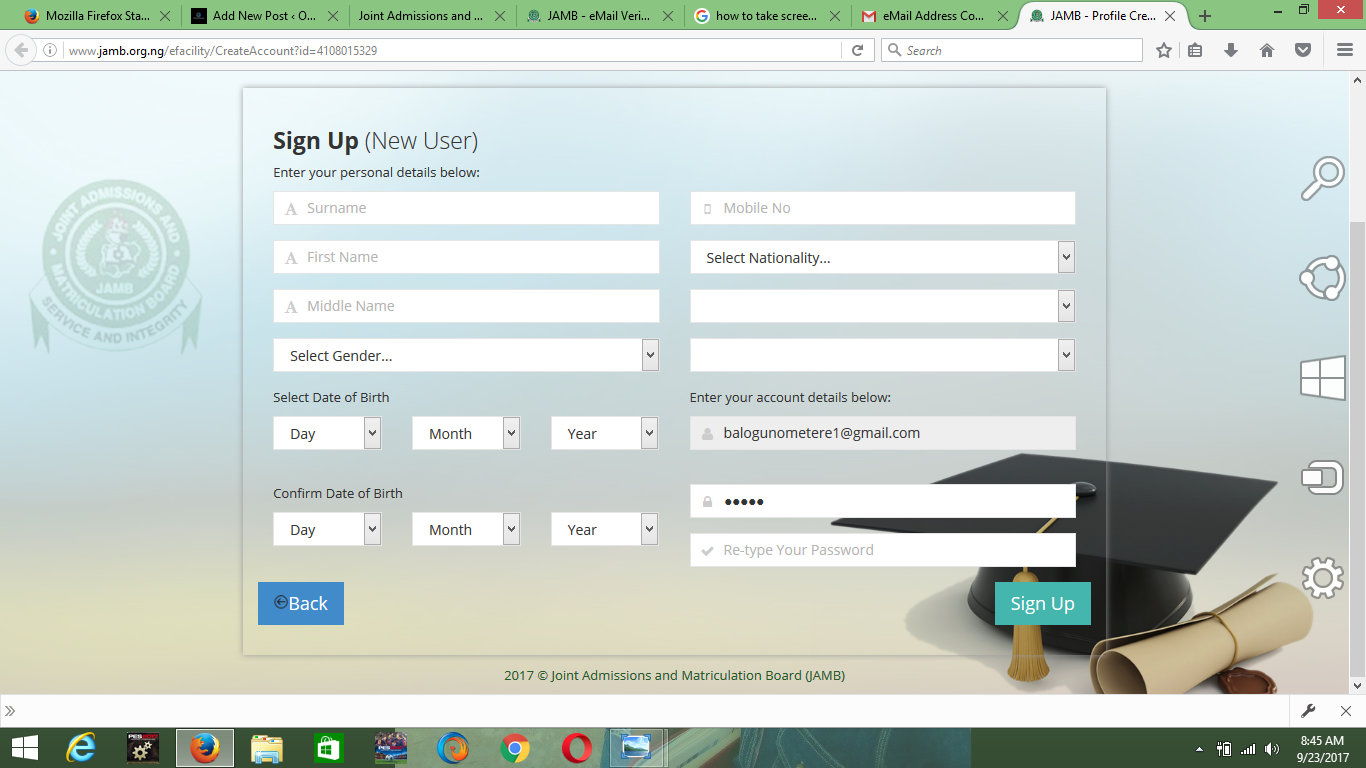
- Create your account.
- Verify your email.
- Complete your personal information.
- Review every detail carefully.
- Save your login information.
Once your profile is ready, you can continue with your JAMB registration.
What Is a JAMB Profile?
A JAMB profile is your personal account on the official JAMB portal.
Think of it as your digital identity.
It stores your personal information.
It also gives you access to almost every JAMB service.
Without it, you cannot continue with the admission process.
Why Is a JAMB Profile Important?
Your profile allows you to access many important services.
These include:
- UTME registration
- Direct Entry registration
- Admission status
- CAPS
- Result checking
- Admission letter printing
- Change of course
- Change of institution
- Data correction
- Other admission services
You will continue using this profile throughout your admission journey.
Who Should Create a JAMB Profile?
You should create one if you want to:
- Register for UTME.
- Apply through Direct Entry.
- Check your admission status.
- Print JAMB documents.
- Access JAMB CAPS.
- Apply for JAMB services in the future.
Every candidate needs one.
Requirements for JAMB Profile Creation
Before you begin, prepare the following.
A Valid Phone Number
Use your personal phone number.
Keep it active throughout the admission process.
Do not use someone else’s number.
A Valid Email Address
Your email is very important.
It will be used to verify your account.
It will also help you recover your password if you forget it.
Choose an email address you check regularly.
Correct Personal Details
Make sure you know your:
- Full name
- Date of birth
- Gender
- State of origin
- Local Government Area
- Nationality
Every detail should match your official records.
Stable Internet Connection
A reliable internet connection helps you complete the process without interruption.
Benefits of Creating Your Profile Early
Many candidates wait until registration begins.
That is not always the best idea.
Creating your profile early gives you several advantages.
You can:
- Detect mistakes early.
- Verify your email.
- Secure your account.
- Prepare for registration.
- Avoid last-minute pressure.
Early preparation reduces stress.
Before You Start
Read these tips first.
They can save you from common mistakes.
- Use your correct names.
- Use one active phone number.
- Use one active email address.
- Double-check every detail.
- Create a strong password.
- Keep your login details safe.
These small steps can prevent bigger problems later.
Step-by-Step Guide to Creating Your JAMB Profile
The process is straightforward.
Follow each step carefully.
Step 1: Confirm That Registration Has Started
Before creating your profile, make sure JAMB has officially announced the registration exercise.
Ignore rumours.
Follow only verified updates.
Step 2: Prepare Your Phone Number
Use a phone number that belongs to you.
Keep it active.
You may need it throughout the admission process.
Step 3: Prepare Your Email Address
Your email address should be active and accessible.
You will receive important notifications there.
Do not use an email you rarely check.
Step 4: Generate Your Profile Code
Your Profile Code is unique.
It links your information to your registration.
Follow the official instructions provided by JAMB to generate it.
Store the code safely.
You will need it again.
Step 5: Visit the Official JAMB Portal
Open the official JAMB e-Facility portal.
Create your account using your email address.
Avoid unofficial websites.
Always confirm that you are using the correct portal.
Step 6: Verify Your Email
After registration, open your inbox.
Find the verification email.
Click the verification link.
If you cannot find it, check your spam folder.
Step 7: Complete Your Personal Information
Enter every detail carefully.
Check the spelling of your name.
Confirm your date of birth.
Review your contact information.
Accuracy matters.
Step 8: Review Everything
Before leaving your account, check everything again.
Confirm:
- Full name
- Date of birth
- Phone number
- Email address
- State of origin
- Local Government Area
Correct mistakes immediately if possible.
Step 9: Save Your Login Details
Write down your:
- Email address
- Password
- Profile information
Keep them in a secure place.
You will need them many times during admission.
Did You Know?
Many candidates lose access to their JAMB profile because they forget their password or no longer have access to the email address they used.
Keeping your login details safe can save you time and frustration.
JAMB Profile Code Explained, Common Problems and Expert Tips
You now know how to create your JAMB profile.
The next step is understanding your Profile Code and how to protect your account.
Many candidates lose valuable time because they do not understand how their profile works.
This section explains everything you need to know.
What Is a JAMB Profile Code?
A JAMB Profile Code is a unique code linked to your profile.
It helps identify you throughout the registration process.
You will need it before completing your UTME or Direct Entry registration.
Keep it private.
Do not share it with anyone you do not trust.
Why Is the Profile Code Important?
Your Profile Code plays a major role during registration.
It helps you:
- Link your registration to your profile.
- Complete your JAMB application.
- Access registration services.
- Continue your admission process.
Without it, completing your registration may become difficult.
Can Two Candidates Use the Same Phone Number?
No.
Each candidate should use a personal phone number.
Using another person’s number can create problems later.
Choose a number you can keep active throughout the admission process.
Can I Use My Old JAMB Profile?
If you are a returning candidate, you may already have a profile.
In many admission cycles, JAMB allows returning candidates to continue using their existing profile instead of creating a new one.
Always follow the latest official instructions for your registration year.
Should I Create More Than One JAMB Profile?
No.
One profile is enough.
Creating multiple profiles can lead to unnecessary complications.
Always use the same profile for your admission activities unless JAMB officially instructs otherwise.
Common Problems During Profile Creation
Most profile problems are easy to avoid.
Here are the ones candidates experience most often.
Wrong Email Address
Some candidates enter an email address with a typing mistake.
Others use an email they cannot access.
Always check your email carefully before submitting.
Incorrect Name
Your names should match your official records.
A spelling mistake may require correction later.
Review every name before creating your profile.
Forgotten Password
Many candidates forget their passwords after creating their accounts.
Store your password somewhere safe.
Avoid using passwords that are difficult to remember.
Phone Number Issues
Use your own phone number.
Avoid borrowing another person’s SIM card.
You may need your phone number again during admission.
Ignoring Email Verification
Do not skip email verification.
Your account should be fully verified before you proceed with registration.
How to Recover a Forgotten Password
If you forget your password, use the password recovery option available on the official JAMB portal.
Follow the instructions carefully.
Choose a new password that is strong but easy for you to remember.
Keep it private.
What If You Forget Your Profile Code?
Do not panic.
JAMB usually provides official methods for recovering important registration details.
Follow the recovery instructions announced for your admission year.
Avoid unofficial websites that promise instant recovery.
How to Keep Your JAMB Profile Safe
Protecting your account is very important.
Follow these simple tips.
- Use a strong password.
- Never share your password.
- Keep your phone number active.
- Protect your email account.
- Avoid logging in on public computers.
- Sign out after using shared devices.
These habits can protect your information.
Mistakes That Can Delay Your Admission
Some mistakes seem small.
However, they can create serious problems later.
Avoid these errors.
Using Different Names
Your names should remain consistent across your documents.
Differences can delay admission processing.
Using an Inactive Email
Always use an email address you can access easily.
You may receive important admission updates there.
Losing Login Details
Write your login information down.
Store it somewhere safe.
Do not depend on memory alone.
Sharing Your Account
Never allow another person to manage your account without your knowledge.
Protect your personal information.
Expert Tips
These simple habits can save you time.
Create Your Profile Early
Do not wait until the registration deadline.
Early preparation reduces stress.
Double-Check Everything
Review every detail before leaving your account.
Correcting mistakes later may require additional processing.
Use Accurate Information
Every detail should match your official records.
Accuracy is important throughout the admission process.
Keep Your Documents Together
Create a folder for your admission documents.
Store your registration slip, profile details, and other important records there.
This makes them easy to find whenever you need them.
Did You Know?
Many candidates spend hours trying to recover forgotten login details.
Keeping your email, password, and phone number secure can prevent this problem completely.
Frequently Asked Questions About JAMB Profile Creation, Checklist and Final Tips
You have now learned how to create your JAMB profile.
You also understand how to protect your account and avoid common mistakes.
This final section answers the questions candidates ask most often.
It also includes a simple checklist and expert advice.
Frequently Asked Questions (FAQs)
What Is a JAMB Profile?
A JAMB profile is your personal account on the official JAMB portal.
It gives you access to registration and other admission services.
Is a JAMB Profile Compulsory?
Yes.
Every UTME and Direct Entry candidate needs a JAMB profile before completing registration.
Can I Register for JAMB Without a Profile?
No.
You must create your profile before you can continue with registration.
Is Profile Creation Free?
Creating your JAMB profile itself does not require a separate profile creation fee. However, some registration-related services may involve official charges announced by JAMB during the admission cycle.
Always confirm current fees through official JAMB announcements.
Can I Use Someone Else’s Phone Number?
No.
Use your own phone number.
Keep it active throughout the admission process.
Can I Use Someone Else’s Email Address?
No.
Always use an email address that belongs to you.
You may need it to recover your account later.
Can I Change My Email Address Later?
Some profile details may be corrected through official JAMB procedures when available.
Follow only the correction process announced by JAMB.
Can I Create More Than One Profile?
No.
One candidate should have one profile.
Multiple profiles can create unnecessary problems.
Can Returning Candidates Use Their Old Profile?
In many admission cycles, returning candidates continue using their existing profile.
Always follow the latest official guidance.
What Should I Do If I Forget My Password?
Use the password recovery option on the official JAMB portal.
Follow the instructions carefully.
What If I Forget My Profile Code?
Use only the official recovery procedure provided by JAMB.
Avoid unofficial websites or agents.
Why Is My Email Verification Important?
Email verification confirms ownership of your account.
Without it, some services may not work correctly.
Can I Create My Profile Before Registration Starts?
You should follow the official registration timetable announced by JAMB.
Preparing your documents early is always a good idea.
Can I Use One Email for Two Candidates?
No.
Each candidate should have a separate email address.
Can I Share My Password?
No.
Keep your password private.
Sharing it puts your account at risk.
Do I Need My Profile After Registration?
Yes.
Your profile remains important throughout your admission journey.
You may use it to:
- Check admission status.
- Print documents.
- Access CAPS.
- Request corrections.
- Complete other JAMB services.
JAMB Profile Creation Checklist
Before you proceed to purchase your ePIN or continue with registration, confirm the following.
✔ My full name is correct.
✔ My email address is correct.
✔ My phone number is correct.
✔ My date of birth is correct.
✔ My state of origin is correct.
✔ My Local Government Area is correct.
✔ My password is secure.
✔ My email has been verified.
✔ My login details are stored safely.
✔ I can successfully log in to my profile.
If every answer is yes, you are ready for the next stage.
What Should You Do After Creating Your Profile?
Creating your profile is only the beginning.
Here are the next steps.
Learn About JAMB Registration
Understand the registration process before it begins.
Knowing what to expect makes registration easier.
Confirm Your Subject Combination
Every course has its own UTME subject requirements.
Check them before registration.
Study the JAMB Brochure
The brochure explains admission requirements for approved courses and institutions.
Reading it can help you make better choices.
Prepare Your O’Level Results
Ensure your examination results meet the requirements for your preferred course.
Begin Your Examination Preparation
Do not wait until registration is complete before studying.
Start early.
Small daily study sessions produce better results than last-minute reading.
Common Myths About JAMB Profile Creation
Let’s clear up a few common misconceptions.
Myth: I Need a New Profile Every Year.
Fact: Many returning candidates continue using their existing profile, depending on JAMB’s official guidelines.
Myth: I Can Use Any Email Address.
Fact: Your email should belong to you and remain accessible.
Myth: I Can Ignore Small Mistakes.
Fact: Even a minor error may create problems later.
Always review your information carefully.
Myth: Someone Else Can Manage My Account.
Fact: Your account contains personal information.
Keep control of it yourself.
Expert Advice
Follow these simple tips.
Keep Your Phone Number Active
You may receive important updates through your registered phone number.
Check Your Email Regularly
Important notifications may arrive there.
Do not ignore your inbox.
Save Your Login Details
Store them safely.
You will use them throughout your admission process.
Follow Official Information
Ignore rumours.
Use verified information whenever you make important admission decisions.
Related O3Schools Resources
Latest JAMB News & Updates
Stay informed with the latest JAMB news, registration updates, examination announcements, admission policies, result checking guides, and official notices to help you succeed in your UTME journey.
Latest JAMB News Today
Read the latest JAMB announcements, official updates, and breaking education news for UTME candidates.
Read Updates →JAMB Registration Guide
Everything you need to know about JAMB registration, profile creation, NIN, approved CBT centres and deadlines.
Read Guide →JAMB Exam Date
Find the latest UTME examination timetable, schedules, mock exam dates and important deadlines.
View Details →JAMB Slip Reprinting
Learn how to print your examination slip and locate your CBT examination centre.
Learn More →Check JAMB Result
Step-by-step guide on checking your UTME result online or via SMS without stress.
Check Guide →JAMB CAPS Portal
Accept or reject admission offers and monitor your admission status through JAMB CAPS.
Open Guide →JAMB Cut-Off Marks
See the latest cut-off marks for universities, polytechnics, colleges of education and nursing schools.
See Cut-Off Marks →JAMB Subject Combination
Find the correct UTME subject combination for every university course in Nigeria.
View Subjects →JAMB Syllabus
Download the latest JAMB syllabus for every subject and prepare according to the official curriculum.
Download Syllabus →JAMB Brochure
Explore courses, admission requirements and institutions approved by JAMB.
Browse Brochure →JAMB Registration Guides & Tutorials
Follow our step-by-step JAMB registration guides to complete every stage of the UTME registration process successfully. Learn how to create your JAMB profile, generate your profile code, link your email, correct mistakes, and prepare for the examination without stress.
How to Register for JAMB
Complete step-by-step guide to registering for the Unified Tertiary Matriculation Examination (UTME).
Read Guide →Create JAMB Profile
Learn how to create your JAMB profile correctly before purchasing the registration form.
Learn More →Generate JAMB Profile Code
Generate your JAMB profile code using your NIN and complete your registration successfully.
View Steps →Link Email to JAMB Profile
Connect your email address to your JAMB profile for CAPS, admission, and other services.
Read Tutorial →Retrieve JAMB Profile Code
Forgot or lost your JAMB profile code? Learn how to retrieve it quickly.
Recover Now →JAMB Change of Course & Institution
Change your preferred course or institution after the UTME using the official process.
Read Guide →JAMB Data Correction
Correct your name, date of birth, gender, state of origin, passport and other details.
Learn More →Reset JAMB Password
Recover or reset your JAMB portal password and regain access to your account.
Reset Password →Approved JAMB CBT Centres
Find accredited CBT centres for registration, mock examination, and UTME nationwide.
Find Centres →JAMB Frequently Asked Questions
Get answers to common questions about registration, profile code, examination, results, and admission.
View FAQs →To prepare fully for admission, you should also read:
- JAMB Registration Guide
- JAMB Subject Combination for All Courses
- JAMB Brochure
- JAMB Syllabus
- JAMB Recommended Textbooks
- JAMB CBT Practice Questions
- JAMB Cut-Off Marks
- JAMB CAPS Guide
- Post-UTME Forms
- Admission Lists
- Acceptance Fee Guide
- School Fees Guide
Reading these guides together will give you a complete understanding of the admission process.
Final Thoughts
Creating your JAMB profile is one of the first and most important steps in your admission journey.
Take your time.
Use accurate information.
Protect your login details.
Review every detail before moving to the next stage.
A few extra minutes spent checking your profile today can save you from unnecessary stress later.
After creating your profile, continue preparing for your examination.
Study consistently.
Choose the correct subject combination.
Read the JAMB Brochure.
Stay informed through reliable updates.
Most importantly, believe in yourself.
With proper preparation and the right information, you can complete your registration with confidence and improve your chances of gaining admission into your preferred institution.
Bookmark this page and return whenever you need guidance on JAMB profile creation or other admission-related topics.
O3Schools will continue to provide simple, accurate, and regularly updated resources to support you throughout your admission journey.
We wish you success in your UTME, Post-UTME, and admission process.
JAMB Subject Combination for Popular Courses
Find the correct JAMB subject combination for your preferred course before completing your UTME registration. Choosing the right subjects helps you avoid admission issues and improves your chances of gaining admission into your desired university.
Medicine & Surgery
Correct UTME subjects and O’Level requirements.
Nursing
Approved JAMB subject combination for Nursing.
Pharmacy
Required JAMB subjects for Pharmacy.
Law
UTME subjects and admission requirements.
Computer Science
Correct subject combination for Computer Science.
Accounting
JAMB subjects for Accounting.
Business Administration
Required UTME subjects.
Mass Communication
Correct JAMB combination.
Engineering
Subject combinations for Engineering courses.
Civil Engineering
Required UTME subjects.
Mechanical Engineering
Approved JAMB subjects.
Electrical Engineering
Correct subject combination.
Architecture
Admission requirements.
Economics
UTME subjects for Economics.
Political Science
Correct subject combination.
English Language
Required UTME subjects.
Biology
Correct JAMB combination.
Microbiology
Admission requirements.
Public Administration
Required JAMB subjects.
Psychology
Correct subject combination.
JAMB Syllabus for All Subjects
Download and study the latest JAMB syllabus for every UTME subject. The syllabus outlines the official topics candidates are expected to cover before the examination and helps you prepare effectively.
Use of English Syllabus
Official JAMB syllabus for English Language.
Mathematics Syllabus
Complete topics for JAMB Mathematics.
Physics Syllabus
Official Physics syllabus for UTME candidates.
Chemistry Syllabus
Study all Chemistry topics recommended by JAMB.
Biology Syllabus
Official Biology syllabus and objectives.
Economics Syllabus
Topics and objectives for JAMB Economics.
Government Syllabus
Latest Government syllabus for UTME.
Commerce Syllabus
Prepare with the official Commerce syllabus.
Accounting Syllabus
Financial Accounting topics for JAMB.
CRS Syllabus
Christian Religious Studies syllabus.
IRS Syllabus
Islamic Religious Studies syllabus.
Literature Syllabus
Poetry, drama and prose topics.
Geography Syllabus
Complete Geography syllabus.
Agricultural Science Syllabus
Official Agricultural Science topics.
Civic Education Syllabus
Latest Civic Education syllabus.
History Syllabus
Official History syllabus for UTME.
French Syllabus
French language topics for JAMB.
Arabic Syllabus
Arabic syllabus and objectives.
Home Economics Syllabus
Topics and objectives for Home Economics.
Music Syllabus
Official Music syllabus for UTME.
I scored 203 in jamb n screening 49/50 but no admission yet…why?
i am been told that i cannot create profile at this time in jamb portal. what do i do? i’m an old student and need to print my jamb stuffs (result and admission letter) how do i create the profile please
please reply via my email, i’ll appreciate so so much!!
i am been told that i cannot create profile at this time in jamb portal. what do i do? i’m an old student and need to print my jamb stuffs (result and admission letter) how do i create the profile please
please reply via my email, i’ll appreciate so so much!!
I tried 2 create a jamb profile but it said I could not create one now..need hlp.reply via email
Created the profile already but could not log in… It keep telling me incorrect password or email
we have been waiting for unn supplementary list but no news what do i do
I have a problem with my email the both of them are emekageraldine but the problem here is that one ended with o while the other ended with 0 ,,the password are the same
I created my jamb profile with the one that ended with o but when I registered for post utme I forgot and used the one that endd with 0 I don’t know if I can change it
Please reply me
Pls under profile creation, there are two columns for account details. I don’t know what I am to put
Created the profile already but could not log in… It keep telling me incorrect password or email
I tried creating one bt it keeps saying the page is not available or it has being removed pls I need help here
I tried creating a profile but it keeps saying that the page might have been removed or something pls help I need your assistance via email 🙏
I’ve created my jamb profile but unable to Login
i tried creating an account but it says page has been removed .what can i do please?kindly help me out by sending message to my mail.thanks in anticipation
I tried creating my jamb profile but it keeps telling me website removed please what can i do. please send message via email